




|
|
|
Module Based VisualizationA prime example of a module-based visualization package is AVS (Advanced Visual Systems). AVS, a commercial scientific visualization package, is intended for both the infrequent user of visualization software as well as for the more sophisticated user. AVS's "philosophy" is one of modules. The software comes with a wide variety of modules, which are in fact short subroutine programs written in either Fortran or C. The user creates a visualization "network" by selecting a number of these modules and then connecting them together to form a complete visualization program. The modules are generally one of four types:
A look at some "screen snaps" of AVS are perhaps useful. In the first graphic, the AVS screen is presented. Of particular importance are the modules located at the top of the screen. To choose a particular module, the user simply "drags" the module down into the workspace at the bottom of the screen.  The second graphic shows a small "network" consisting of four connected modules. In this case, there are one data input module ("read field"), two data mappers ("volume bounds" and "isosurface") and one data output ("geometry viewer"). Notice that the modules are color-coded. This aids the user in connecting the modules together. The colors represent data types. Color tags on the top of the modules are for data input. Tags on the bottom are for data output. Notice for example that the "read field" module only can output data. Meanwhile, the other modules can accept data from some module above it as well as send data to some module below it. 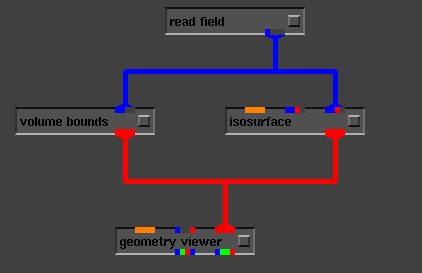 This network reads in a dataset that describes the electron densities (charges) in a molecule of hydrogen, H2. The AVS displays the isosurfaces (surfaces that have equal energy) as well as a "box" (the volume bounds) around the molecule: 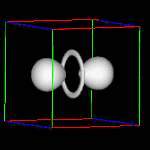 This is a relatively simple visualization, but in fact the data set is quite large and would be difficult for most visualization packages to handle. A more elegant and perhaps typical AVS visualization is shown below. This visualization shows the results of a meteorology simulation. 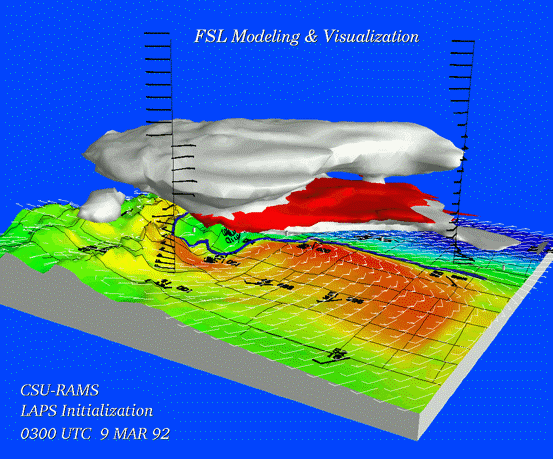 One of the more important air quality modeling packages, UAMGUIDES, uses AVS as the main visualization tools. Report technical/content problems here |
 |