It is necessary for fourth and fifth grade students to be able to convert between fractions, decimals, and percents. Much of this learning must be done through repetition and practice once students begin to grasp the concept.
Objectives
Upon completion of this lesson, students will:
practice naming and converting between fractions decimals and percents.
Standards Addressed:
Student Prerequisites
Arithmetic: Student must be able to:
add, subtract, multiply, and divide whole numbers.
Technological: Students must be able to:
perform basic mouse manipulations such as point, click and drag
Teacher Preparation
Students will need:
access to a browser
pencil and paper
Key Terms
decimal
Short for the term "decimal fraction", a decimal is another way to represent fractional numbers. The decimal uses place value to express the value of a number as opposed to a fraction that uses a numerator and denominator.
decimal number
A fraction where the denominator is a power of ten and is therefore expressed using a decimal point. For example: 0.37 is the decimal equivalent of 37/100
fraction
A rational number of the form a/b where a is called the numerator and b is called the denominator
percent
A ratio that compares a number to one hundred. The symbol for percent is %
Focus and Review
Get the students to think about fractions by asking them to think of things they needed to share by splitting a single object into parts. Possibly give the example of a pizza or a piece of paper.
Objectives
Today, class, we are going to use the computers to help practice our skills working with fractions, decimals, and percents.
Teacher Input
Give students several examples of fractions, decimals and percents used in the real world. Examples such as sharing a pizza, a ruler, measures on bottles or cans for decimals, or food labels for percents. Discuss with the students that these are all representations of the same thing. A fraction can be expressed as a decimal or as a percent and vice versa.
Guided Practice
Give the students time so they may try to solve the problems on the worksheet by themselves. Once the students have had enough time to solve the problems, have them check their fraction to decimal conversion answers using the Fraction Converter applet.
Independent Practice
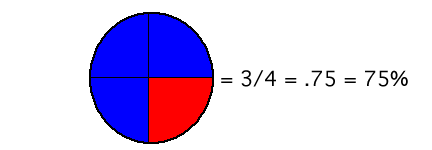
Once the students have opened the pie chart applet, tell them to adjust the applet settings so that the pie chart only has two sections. After all of the settings are correctly adjusted, have the students try to replicate their answers from the worksheet using the two sections. It may be helpful to remind your students the sum of the two sections must equal 100. For example:
You would have the students enter 75% as the percentage for one portion of the circle and 25% for the other. Then the students would compare the circle they colored with the one colored by the Pie chart applet to make sure they look similar. Once the students have completed the worksheet, they can choose partners and play the Fraction Four applet. Be sure you tell them to set the "problem type" in the Fraction Four applet to "fractions, decimals, and percents".
Closure
Have students come to the board and share one of their responses to the worksheet.