|

How to Run the Surface Area and Volume Activity
How Do I Run This Applet?
This java applet requires a java-capable browser. If you don't see the applet, Java may not be functional in your browser or on your machine.
Object of the activity
This activity allows the user to to manipulate three-dimensional polyhedrons
to experiment with surface area and volume.
Controls and Output
- The main area of this applet displays a polyhedron. Clicking and dragging in the main area will rotate the polyhedron to show it from different angles.

- The three buttons on the top allow the user to automatically rotate the polyhedron to see it from three different views. View 1 displays the object looking down the y axis, View 2 displays it from the x axis, and View 3 displays it from the z axis.

- The bottom portion of the applet is a series of controls that tell the user
information about the polyhedron, and allow the user to change some of these values.
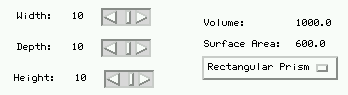
- The three scroll bars at the lower left allow the user to change the dimensions of the polyhedron. The values for the width, depth, and height, are displayed at the left of the scrollbars.
- The volume and surface area of the polyhedron are displayed in the lower right portion of the applet. Try changing the dimensions of the polyhedron and watch how the surface area and volume change!
- Just below the volume and surface area is a choice box. This allows you to choose what kind of polyhedron is displayed. Try and see how the surface area and volume of different objects compare.

Please direct questions and comments about this page to
interactivate@shodor.org
© Copyright 1997-2000 The Shodor Education Foundation, Inc.
|